

Saudi Arabia Nafath
Overview
Nafath is Saudi Arabia’s unified digital identity platform, used by over 23 million people to securely access government and private services.
- ID:
saudi-arabia-nafath - Type: eID (app)
- Category: National ID Wallets
- Verification Type: Presentation
- Regions: Middle East
- Countries: SA
- Adoption: 23,000,000
- URL: https://play.google.com/store/apps/details?id=sa.gov.nic.myid&hl=en
Integration with Trinsic
Nafath verification is integrated into Trinsic's identity acceptance network allowing businesses to verify users against the government system of record in India.
- Data Inputs: National ID Number
- Permission required: Yes
- Cost: Contact the Trinsic team.
User Flow
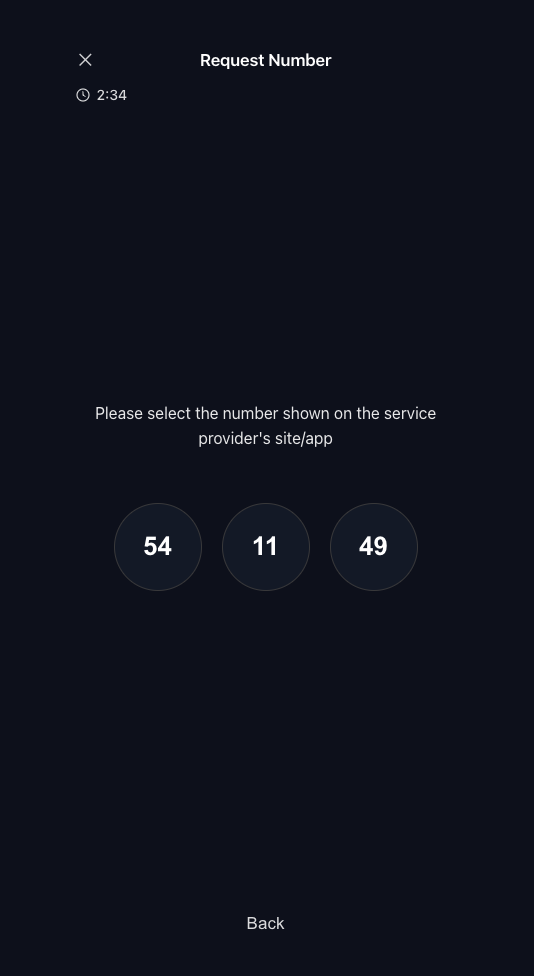
Nafath asks a user for their national ID number to begin the verification flow. Then, we present a one-time challenge code. The individual receives a push notification to the Nafath mobile app, where they must match the challenge code presented with the 3 codes presented in the app. Then, they enter their PIN number for verification.
How to Test
Saudi Arabia Nafath offers two test modes (Synchronous and Simulator), with configurable outcomes. These can be used for automated testing and/or demos.
Configuring the Test
- Decide on a mock national ID number. The first digit of the national ID number represents the type of individual -- citizen (1), resident (2) or visitor (3-5). Change the first digit depending on what kind of result you wish to see. If you are using the simulator, a random national ID will be generated for you (see below).
- Configure Simulator Mode, test outcome and locale.
-
Enable
saudi-arabia-nafathin a Test verification profile and click "configure".
-
Enable or disable Simulator Mode (see Simulator Mode below). Then, set the desired outcome. Please note that the configured test outcome will always be returned upon session completion. Finally, choose a local,
enorar, which will affect the localization of certain fields in the provider-specific output.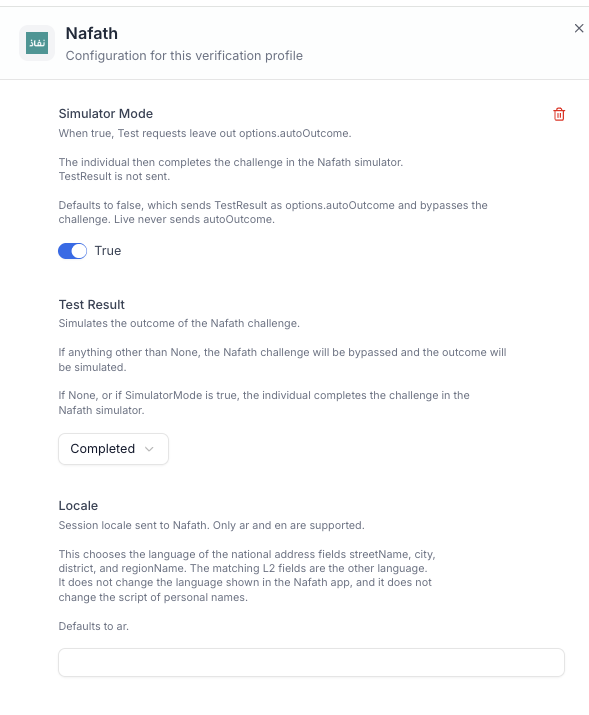
-
Synchronous Mode
This is the default testing mode, and does not invoke the interactive simulator (see below). Instead, it immediately returns the configured test outcome.
- Submit the test ID number for Trinsic verification. Submit your chosen mock national ID number.
- Retrieve session results. You will immediately be presented with mock user data depending on the user type -- citizen, resident or visitor.
Simulator Mode
-
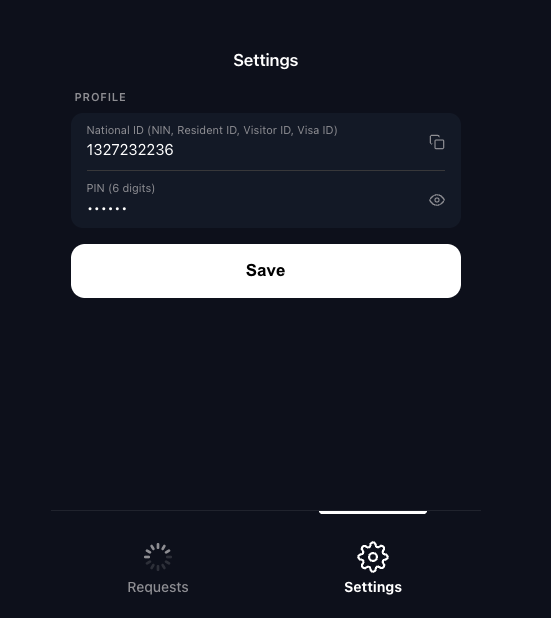
Configure the simulator. In Test Mode, the Trinsic integration uses a simulator hosted publicly at https://nafath.trinsic.id/. Configure a number & a PIN on the Settings page. By default, a random mock National ID is generated for you, but you can customize it if you wish.
-
Submit the test ID number for Trinsic verification. Enable
saudi-arabia-nafathin a Test verification profile and submit the test ID number configured in the simulator. You will be presented with a challenge code. Note: Make sure the simulator is open before you begin the verification, so you can receive the push notification. -
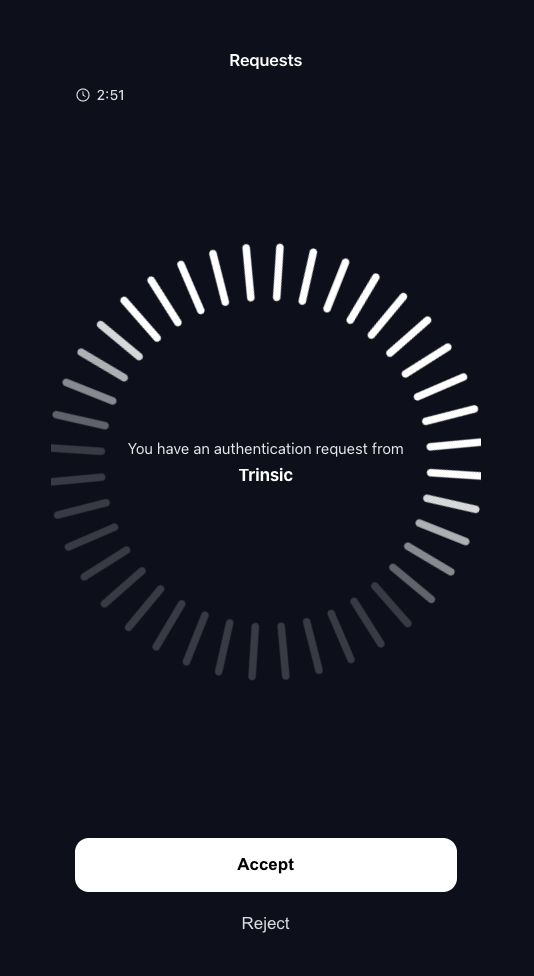
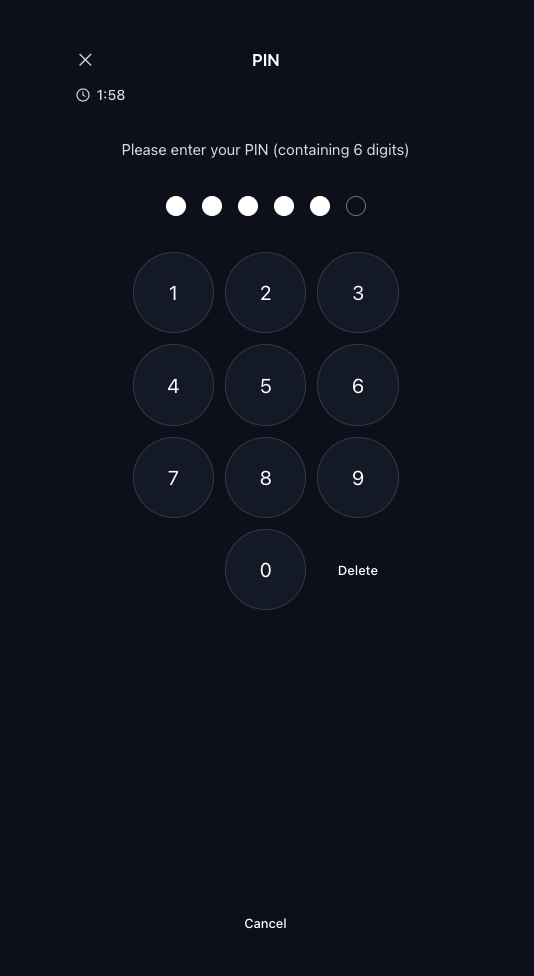
Enter the challenge number & PIN in the simulator. The simulator will receive a push notification, and you will be prompted to enter the challenge code presented to you by Trinsic.
-
Retrieve session results. Upon completion of the verification, you will be presented with mock user data depending on the user type -- citizen, resident or visitor.
Direct API Requirements
Direct API is not a requirement.You can integrate with this provider using the Hosted UI instead, with no additional integration requirements on your end.
What your integration must support in order to use this provider with the Direct Provider Sessions API.
- Supports Direct Provider Sessions: ✅
- Launch Method:
ShowContent— Display a piece of content which the user will use to launch themselves into the verification. - Collection Method:
PollResult— Results arrive asynchronously; poll with theresultsAccessKeyreturned at session creation. - Requires Input: This provider requires input before verification can proceed.
- Refreshable Step Content: This provider requires shown content to be refreshed periodically.
- Trinsic-Hosted UI: A Trinsic-Hosted Fallback UI exists for this provider, which may be invoked to cover gaps in your integration's capabilities.
Outputs
Normalized AttributesThese attributes form part of our normalized model, a standardized set used across providers. Trinsic normalizes this for you and lets you know when a property is available for each provider.
| Field | Availability | Notes |
|---|---|---|
person.givenName | Always | - |
person.familyName | Always | - |
person.dateOfBirth | Always | - |
person.nationality | Sometimes | Not available when the Nafath nationality code has no ISO 3166 country, such as 335 (Tribes Emigrated) |
person.sex | Always | - |
person.address.line1 | Sometimes | Available for citizens and residents, not available for temporary visa holders |
person.address.line2 | Sometimes | Available for citizens and residents, not available for temporary visa holders |
person.address.city | Sometimes | Available for citizens and residents, not available for temporary visa holders |
person.address.postalCode | Sometimes | Available for citizens and residents, not available for temporary visa holders |
person.address.country | Sometimes | Available for citizens and residents, not available for temporary visa holders |
document.type | Always | - |
document.number | Always | - |
document.issueDate | Sometimes | Available for citizens and residents, not available for temporary visa holders |
document.expirationDate | Sometimes | Available for citizens and residents, not available for temporary visa holders |
document.issuingCountry | Always | - |
| Field | Optional | Description | Example Values |
|---|---|---|---|
nationalIdentityNumber | Yes | Saudi Arabia national identity number used to authenticate the individual with Nafath. Nafath supports three user types and the leading digit of this number identifies which one signed in: - 1: Saudi citizen national ID, issued by Civil Affairs (Al-Ahwal al-Madaniyya) under the Ministry of Interior. - 2: Resident (Iqama or muqeem) number on the residence permit, issued by the General Directorate of Passports (Al-Jawazat) under the Ministry of Interior. - 3 through 6: Visitor identity number (Hawiyyat Za'ir) for foreign nationals admitted on short-term visas, including tourist, business, family visit, and Umrah visas. Format: - Exactly ten decimal digits. - First digit is the user type as listed above. - Digits two through nine are assigned serially and have no semantic meaning. - For citizen and resident numbers, the tenth digit is a check digit derived from the first nine digits with a modulus-ten style algorithm. No check digit is documented for visitor numbers, and the Nafath sandbox's visitor numbers do not follow it. Nafath returns no identifier for visitors, so for them this is the number the user submitted. | 1035771078 |
userType | Yes | Nafath user type derived from the leading digit of nationalIdentityNumber. The matching attributes object carries the fields Nafath defines only for that user type. Possible values: - Citizen: Saudi citizen national ID (1-series). See citizenSpecificAttributes. - Resident: legally resident foreign national, Iqama (2-series). See residentSpecificAttributes. - Visitor: visitor identity (3 through 6-series). See visitorSpecificAttributes. | Citizen |
sex | Yes | Sex as returned by Nafath, normalized to the platform sex code. Possible values: - Male - Female | Male |
nationality | Yes | Nationality as an ISO 3166-1 alpha-2 country code. Not every nationality passed by back Nafath corresponds to an ISO 3166-1 alpha-2 code, for example code 335 (Tribes Emigrated) or 336 (Turkestan). In these cases, this field is null. See nationalityCode for the raw nationality code. | SA |
nationalityCode | Yes | Nationality code as returned by Nafath under nationalityCode. This is the Saudi government's three-digit nationality code, grouped by region: - 1xx Arab states - 2xx North Africa - 3xx Asia, Middle East, and Oceania - 4xx Sub-Saharan Africa - 5xx Europe - 6xx Americas - 7xx Oceania It is not an ISO 3166 numeric code. For example, 504 is Ireland according to Nafath but Morocco in ISO 3166. See https://docs.trinsic.id/docs/saudi-arabia-nafath for a full list. | 113 |
dateOfBirthGregorian | Yes | Date of birth in the Gregorian calendar. | 1987-02-10 |
occupationCode | Yes | Occupation code reported by Nafath. Known values: - O: Other - G: Government | G |
passportNumber | Yes | Passport number reported by Nafath. | X55448 |
citizenSpecificAttributes.arabicFirstName | Yes | Given name in Arabic. Nafath always returns this in Arabic. romanizedFirstName is the English form, and the session locale does not change either name. | محمد |
citizenSpecificAttributes.arabicFatherName | Yes | Father's given name in Arabic. Same script as arabicFirstName. | عبدالله |
citizenSpecificAttributes.arabicGrandFatherName | Yes | Grandfather's given name in Arabic. Same script as arabicFirstName. | سعود |
citizenSpecificAttributes.arabicFamilyName | Yes | Family name in Arabic. Same script as arabicFirstName. | العتيبي |
citizenSpecificAttributes.romanizedFirstName | Yes | Given name in English. Nafath always returns this in English, including when the session locale is Arabic. | Mohammed |
citizenSpecificAttributes.romanizedSecondName | Yes | Father's given name in English. Same script as romanizedFirstName. | Abdullah |
citizenSpecificAttributes.romanizedThirdName | Yes | Grandfather's given name in English. Same script as romanizedFirstName. | Saud |
citizenSpecificAttributes.romanizedLastName | Yes | Family name in English. Same script as romanizedFirstName. | Alotaibi |
citizenSpecificAttributes.dateOfBirthHijri | Yes | Date of birth in the Hijri (Umm al-Qura) calendar, in YYYY-MM-DD format. | 1407-06-12 |
citizenSpecificAttributes.idIssueDateGregorian | Yes | Date the national ID card was issued in the Gregorian calendar. | 2021-12-29 |
citizenSpecificAttributes.idIssueDateHijri | Yes | Date the national ID card was issued in the Hijri calendar, in YYYY-MM-DD format. | 1443-05-25 |
citizenSpecificAttributes.idExpiryDateGregorian | Yes | Date the national ID card expires in the Gregorian calendar. | 2031-12-29 |
citizenSpecificAttributes.idExpiryDateHijri | Yes | Date the national ID card expires in the Hijri calendar, in YYYY-MM-DD format. | 1453-05-25 |
citizenSpecificAttributes.idVersionNumber | Yes | Version number printed on the national ID card. Represents the generation of national ID card this document was issued in. | 4 |
citizenSpecificAttributes.idIssuePlace | Yes | City or office where the national ID card was issued, in Arabic. The session locale does not change it. | الرياض |
citizenSpecificAttributes.socialStatusCode | Yes | Social-status (marital-status) code, from the Nafath socialStatusCode attribute. The numeric code is not unique on its own. The same code maps to different states depending on the value of the top-level sex field. Code by sex: - 0, M: Single - 1, F: Single - 1, M: One wife - 2, F: Married - 2, M: Two wives - 3, F: Divorced - 3, M: Three wives - 4, F: Widow - 4, M: Four wives - 5, F: Pending divorced Combinations not listed are not defined by Nafath. | 1 |
citizenSpecificAttributes.socialStatus | Yes | Social status description in Arabic, from the Nafath socialStatusDesc attribute. The session locale does not change it. socialStatusCode is the separate numeric code. | متزوج |
citizenSpecificAttributes.dependentCount | Yes | Number of current dependents. | 2 |
citizenSpecificAttributes.placeOfBirth | Yes | Place of birth in Arabic. The session locale does not change it. | الرياض |
citizenSpecificAttributes.lastTravelExitDateGregorian | Yes | Most recent travel exit date in the Gregorian calendar. | 2025-07-15 |
citizenSpecificAttributes.lastTravelExitDateHijri | Yes | Most recent travel exit date in the Hijri calendar, in YYYY-MM-DD format. | 1447-01-20 |
citizenSpecificAttributes.lastTravelEntryDateGregorian | Yes | Most recent travel entry date in the Gregorian calendar. | 2025-08-01 |
citizenSpecificAttributes.lastTravelEntryDateHijri | Yes | Most recent travel entry date in the Hijri calendar, in YYYY-MM-DD format. | 1447-02-07 |
citizenSpecificAttributes.isMinor | Yes | True when the citizen is a minor. | false |
citizenSpecificAttributes.headOfHousehold.nationalIdentityNumber | Yes | Head of household national identity number. | 1023456789 |
citizenSpecificAttributes.headOfHousehold.arabicFirstName | Yes | Head of household given name in Arabic. | عبدالرحمن |
citizenSpecificAttributes.headOfHousehold.arabicFatherName | Yes | Head of household father name in Arabic. | سعد |
citizenSpecificAttributes.headOfHousehold.arabicGrandFatherName | Yes | Head of household grandfather name in Arabic. | محمد |
citizenSpecificAttributes.headOfHousehold.arabicFamilyName | Yes | Head of household family name in Arabic. | القحطاني |
citizenSpecificAttributes.nationalAddresses | Yes | Registered Saudi national addresses, as structured fields. Saudi Post (SPL) documents how to enter a national address on checkout and international forms: Line 1 is building number, unit number, and street name. Line 2 is the additional number and district. Then city and postal code. The country is always Saudi Arabia because Nafath only ever returns Saudi national addresses. https://splonline.com.sa/en/door-step/ | [ {'{'}<br /> "buildingNumber": "1234",<br /> "street": "طريق الملك فهد",<br /> "district": "العليا",<br /> "city": "الرياض",<br /> "postalCode": "12345",<br /> "additionalNumber": "6789",<br /> "unitNumber": "12B",<br /> "locationCoordinates": "46.675296 24.713552",<br /> "isPrimaryAddress": true,<br /> "regionName": "منطقة الرياض",<br /> "regionNameSecondary": "Riyadh Region",<br /> "citySecondary": "Riyadh",<br /> "streetSecondary": "King Fahd Road",<br /> "districtSecondary": "Al Olaya",<br /> "cityId": "101",<br /> "regionId": "01",<br /> "districtId": "402"<br /> {'}'} ] |
residentSpecificAttributes.arabicFirstName | Yes | Given name in Arabic. Nafath always returns this in Arabic. romanizedFirstName is the English form, and the session locale does not change either name. | أحمد |
residentSpecificAttributes.arabicSecondName | Yes | Second name in Arabic. Same script as arabicFirstName. | خالد |
residentSpecificAttributes.arabicThirdName | Yes | Third name in Arabic. Same script as arabicFirstName. | رحمن |
residentSpecificAttributes.arabicLastName | Yes | Last name in Arabic. Same script as arabicFirstName. | الأنصاري |
residentSpecificAttributes.romanizedFirstName | Yes | Given name in English. Nafath always returns this in English, including when the session locale is Arabic. | Ahmed |
residentSpecificAttributes.romanizedSecondName | Yes | Second name in English. Same script as romanizedFirstName. | Khalid |
residentSpecificAttributes.romanizedThirdName | Yes | Third name in English. Same script as romanizedFirstName. | Rahman |
residentSpecificAttributes.romanizedLastName | Yes | Last name in English. Same script as romanizedFirstName. | Ansari |
residentSpecificAttributes.nationalityDescription | Yes | English nationality name. | India |
residentSpecificAttributes.dateOfBirthHijri | Yes | Date of birth in the Hijri (Umm al-Qura) calendar, in YYYY-MM-DD format. | 1408-12-15 |
residentSpecificAttributes.iqamaIssueDateGregorian | Yes | Date the Iqama was issued in the Gregorian calendar. | 2022-05-15 |
residentSpecificAttributes.iqamaIssueDateHijri | Yes | Date the Iqama was issued in the Hijri calendar, in YYYY-MM-DD format. | 1443-10-14 |
residentSpecificAttributes.iqamaExpiryDateGregorian | Yes | Date the Iqama expires in the Gregorian calendar. | 2027-05-14 |
residentSpecificAttributes.iqamaExpiryDateHijri | Yes | Date the Iqama expires in the Hijri calendar, in YYYY-MM-DD format. | 1448-11-08 |
residentSpecificAttributes.iqamaVersionNumber | Yes | Version number printed on the Iqama. Represents the Iqama permit generation version. | 4 |
residentSpecificAttributes.iqamaIssuePlace | Yes | Name of the city or office that issued the Iqama, in Arabic. The session locale does not change it. | الرياض |
residentSpecificAttributes.iqamaIssuePlaceCode | Yes | Code for the office that issued the Iqama. | 1 |
residentSpecificAttributes.occupationDescription | Yes | Free-text occupation description. | Software Engineer |
residentSpecificAttributes.socialStatusCode | Yes | Social-status (marital-status) code, from the Nafath socialStatusCode attribute. The numeric code is not unique on its own. The same code maps to different states depending on the value of the top-level sex field. Code by sex: - 0, M: Single - 1, F: Single - 1, M: One wife - 2, F: Married - 2, M: Two wives - 3, F: Divorced - 3, M: Three wives - 4, F: Widow - 4, M: Four wives - 5, F: Pending divorced Combinations not listed are not defined by Nafath. | 1 |
residentSpecificAttributes.socialStatus | Yes | Social status in uppercase English, for example MARRIED, from the Nafath socialStatus attribute. Possible English values include: Single, Married, Divorced, Widow, Pending Divorced, One Wife, Two Wives, Three Wives, Four Wives. | MARRIED |
residentSpecificAttributes.placeOfBirth | Yes | Place of birth name. | Mumbai |
residentSpecificAttributes.placeOfBirthCode | Yes | Code for the place of birth. | MUM |
residentSpecificAttributes.sponsorName | Yes | Name of the entity sponsoring the Iqama, typically an employer. | Acme Trading LLC |
residentSpecificAttributes.legalStatus | Yes | Legal status. | Resident |
residentSpecificAttributes.inOutIndicator | Yes | Whether the resident is currently inside or outside Saudi Arabia based on their last recorded travel event. Possible values include: - IN: most recent travel event was an entry into Saudi Arabia. - OUT: most recent travel event was an exit from Saudi Arabia. | IN |
residentSpecificAttributes.nationalAddresses | Yes | Registered Saudi national addresses. Saudi Post (SPL) documents how to enter a national address on checkout and international forms: Line 1 is building number, unit number, and street name. Line 2 is the additional number and district. Then city and postal code. The country is always Saudi Arabia. https://splonline.com.sa/en/door-step/ | [ {'{'}<br /> "buildingNumber": "55",<br /> "street": "شارع التوبة",<br /> "district": "العليا",<br /> "city": "الرياض",<br /> "postalCode": "12214",<br /> "additionalNumber": "3030",<br /> "unitNumber": "12A",<br /> "locationCoordinates": "46.675296 24.713552",<br /> "isPrimaryAddress": true,<br /> "regionName": "منطقة الرياض",<br /> "regionNameSecondary": "Riyadh Region",<br /> "citySecondary": "Riyadh",<br /> "streetSecondary": "At Tawbah",<br /> "districtSecondary": "Al Olaya",<br /> "cityId": "101",<br /> "regionId": "01",<br /> "districtId": "402"<br /> {'}'} ] |
visitorSpecificAttributes.loginType | Yes | Credential the visitor used to log in to Nafath. Possible values: - VisaNumber: the visitor authenticated with the visa number printed on their visa document. - BorderNumber: the visitor authenticated with their border number (raqam al-hudud), the ten-digit identifier the General Directorate of Passports (Jawazat) assigns to a foreign national on entry into Saudi Arabia, used as their entry-linked identifier before any residency is issued. | VisaNumber |
visitorSpecificAttributes.firstName | Yes | First name in English. Nafath describes firstName, secondName, thirdName, and lastName as English. translatedFirstName is the Arabic form. The session locale does not change either name. | Fatima |
visitorSpecificAttributes.secondName | Yes | Second name in English. Same script as firstName. | Ali |
visitorSpecificAttributes.thirdName | Yes | Third name, from the Nafath thirdName attribute. See firstName for the script. | Hassan |
visitorSpecificAttributes.lastName | Yes | Last name, from the Nafath lastName attribute. See firstName for the script. | Mohammed |
visitorSpecificAttributes.translatedFirstName | Yes | First name in Arabic, from the Nafath translatedFirstName attribute. Nafath's descriptions of firstName, secondName, thirdName, and lastName call those fields English, so the translated names are treated as Arabic for both visa-number and border-number logins. The session locale does not change either script. | فاطمة |
visitorSpecificAttributes.translatedSecondName | Yes | Second name in Arabic. Same script as translatedFirstName. | علي |
visitorSpecificAttributes.translatedThirdName | Yes | Third name in Arabic. Same script as translatedFirstName. | حسن |
visitorSpecificAttributes.translatedLastName | Yes | Last name in Arabic. Same script as translatedFirstName. | محمد |
visitorSpecificAttributes.nationalityDescription | Yes | English nationality name, from the Nafath nationalityDesc attribute. | Egypt |
visitorSpecificAttributes.dateOfBirthHijri | Yes | Date of birth in the Hijri (Umm al-Qura) calendar, in YYYY-MM-DD format, from the Nafath birthhDate attribute. Only returned for visa-number logins; the appendix defines no Hijri date of birth for border-number logins. Nafath's examples also use DD-MM-YYYY and YYYY/MM/DD; Trinsic reorders those to YYYY-MM-DD and passes any other format through unchanged. | 1412-08-21 |
visitorSpecificAttributes.visaNumber | Yes | Visa number, from the Nafath visaNumber attribute. Can contain letters as well as digits. | V20251234567 |
visitorSpecificAttributes.visaDurationDays | Yes | Count of days from visa issue to visa expiry, parsed from the Nafath duration attribute. Null when duration is absent or not a valid integer. | 90 |
visitorSpecificAttributes.visaIssueDate | Yes | Date the visa was issued, from the Nafath visaIssueDate attribute. | 2025-01-15 |
visitorSpecificAttributes.visaExpiryDate | Yes | Final date the visitor is permitted to enter Saudi Arabia, from the Nafath visaExpiryDate attribute. | 2025-04-15 |
visitorSpecificAttributes.finalDepartureDate | Yes | Last day the visitor may legally remain in Saudi Arabia, from the Nafath finalDepartureDate attribute. | 2025-05-01 |
visitorSpecificAttributes.numberOfEntriesCode | Yes | Number-of-entries code, from the Nafath numberOfEntriesCode attribute. Known values: - 1: Single entry - 9: Multiple entry | 1 |
visitorSpecificAttributes.numberOfEntriesDescriptionArabic | Yes | Arabic description of the entries the visa allows, from the Nafath numberOfEntriesDescAr attribute. | دخول واحد |
visitorSpecificAttributes.visaTypeCode | Yes | Visa type code, from the Nafath visaTypeCode attribute. The appendix publishes no lookup table; the sandbox returns BUS for a business visit visa. | BUS |
visitorSpecificAttributes.visaTypeDescriptionArabic | Yes | Arabic visa type description, from the Nafath visaTypeDescAr attribute. | تأشيرة زيارة أعمال |
visitorSpecificAttributes.visaTypeDescriptionEnglish | Yes | English visa type description, from the Nafath visaTypeDescEn attribute. | Business Visit |
visitorSpecificAttributes.passportIssueDate | Yes | Date the visitor's passport was issued, from the Nafath passportIssueDate attribute. | 2023-04-10 |
visitorSpecificAttributes.passportExpiryDate | Yes | Date the visitor's passport expires, from the Nafath passportExpiryDate attribute. | 2033-04-09 |
visitorSpecificAttributes.occupationDescriptionArabic | Yes | Arabic occupation description, from the Nafath occupationDescAr attribute. | مهندس |
visitorSpecificAttributes.occupationDescriptionEnglish | Yes | English occupation description, from the Nafath occupationDescEn attribute. | Engineer |
visitorSpecificAttributes.birthCountryArabic | Yes | Arabic name of the visitor's birth country, from the Nafath birthCountryDescAr attribute. | مصر |
visitorSpecificAttributes.birthCountryEnglish | Yes | English name of the visitor's birth country, from the Nafath birthCountryDescEn attribute. | Egypt |
visitorSpecificAttributes.entryDate | Yes | Date the visitor entered Saudi Arabia, from the Nafath entryDate attribute. Only returned for border-number logins. | 2025-02-01 |
Updated about 1 hour ago